
System 4 Instructions
Active Thermal Management
Parts List
Before proceeding, check that you have received all of the following:
- (1) System 4 control box
- (1) Fan panel
- (1) Power supply
- (1) Thermal probe
- (1) Grille, metal or wood (if ordered with grille)
General Description (Click here to check or download the PDF File)
The Active Thermal Management System 4 is a self-contained ventilating system designed for small-to-midsize enclosures with moderate heat loads.
⚠️ Note: It is NOT intended to be the “first choice” for cooling a cabinet. Other ATM products can move significantly more air but may require clearance behind the cabinet or involve more than one visible ventilation opening.
The System 4 was developed to meet the challenge of ventilating cabinets using only one small visible vent.
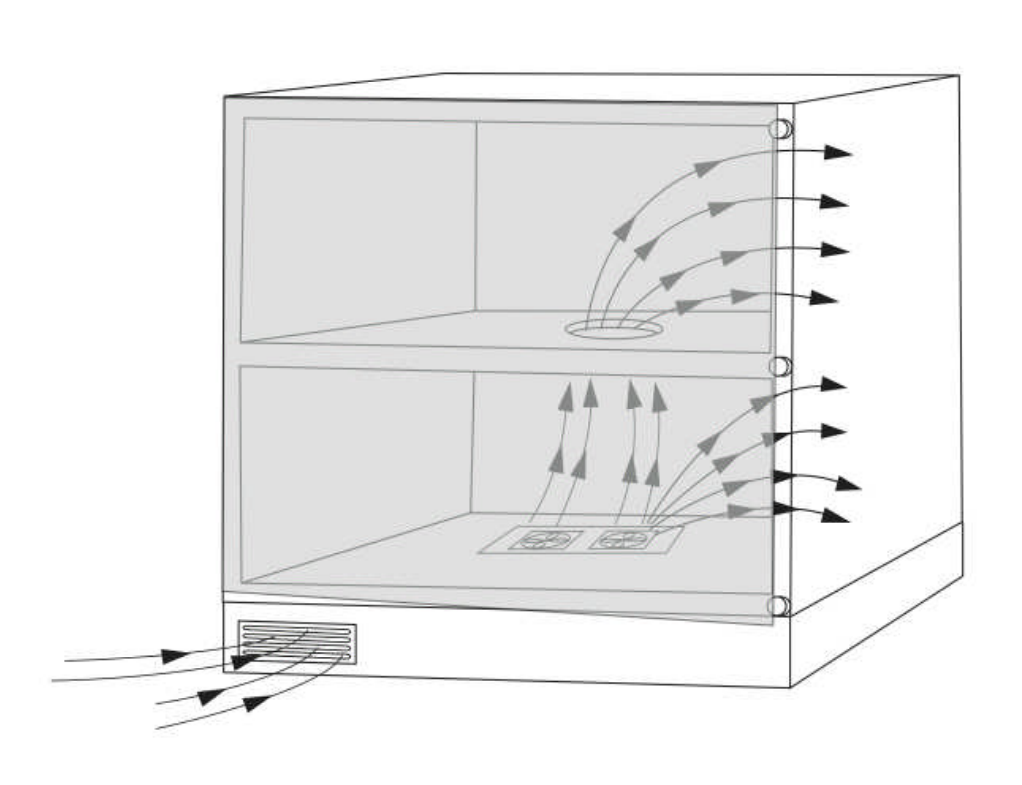
- Airflow path: Room air is drawn under the floor of the cabinet and up into the equipment area by a powerful but very quiet two-speed fan assembly.
- Cooling process: Cool air flows through the rack or shelves before being forced out through door gaps or between the cabinet frame and doors.
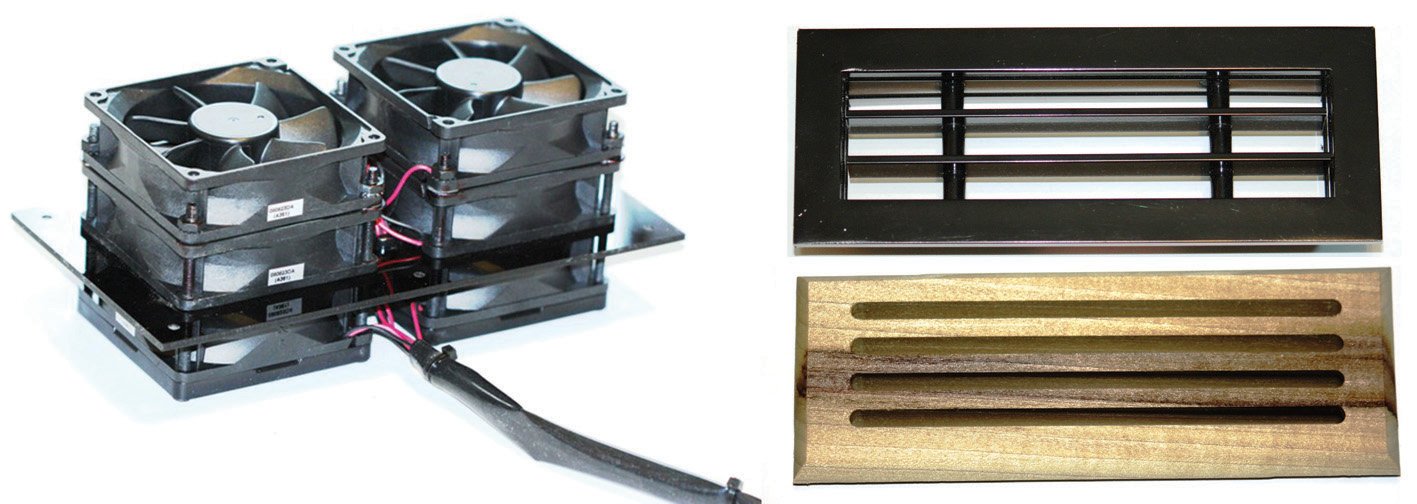
- Components: Control box, power supply, and the “six-pack” fan assembly.
Installation Process
- Fan Panel:
- Cut a 3 ½” × 7 ½” opening in the floor of the cabinet at the rear.
- Ensure no wood chips, sawdust, or dust remain under the opening.
- Drop the fan panel in and center it in the cutout.
- Control Box:
- Mount inside the cabinet where cables are accessible.
- It has 3 LEDs:
- Green = power on
- Yellow = fans at low speed
- Red = fans at high speed (yellow remains on in high mode)
- Fan Wiring:
- Connect fan wires to any of the 4 terminal blocks.
- Red wire → “+” terminal, Black wire → “-” terminal.
- Grille Installation:
- Cut a 2” × 7” opening in the base trim of the cabinet.
- Metal grilles = retained by clips.
- Wood grilles = installed using provided 2-sided adhesive tape or screws.
- Ensure the area beneath is free from dust and debris.
- Door Gaps:
- Check cabinet gaps:
- Two-door cabinets typically have 1/8” gaps.
- Single-door cabinets vary.
- If gaps are too small, install provided adhesive bumpers to increase airflow.
- Check cabinet gaps:
- Thermal Probe:
- Place on the major heat source or near the top of the enclosure.
- Some experimentation may be required to find the optimal position.
- System Test:
- Plug in the power supply. (Leave the probe unplugged.)
- Fans should run at full speed, and all LEDs should light.
- Plug in the probe: If the temperature is below ~90°F, fans stop and yellow/red LEDs turn off.
- Warm the probe with a hair dryer (not an open flame):
- At 90°F → fans start at low speed, yellow LED lights.
- At 100°F → fans switch to full speed, red LED lights (yellow stays on).
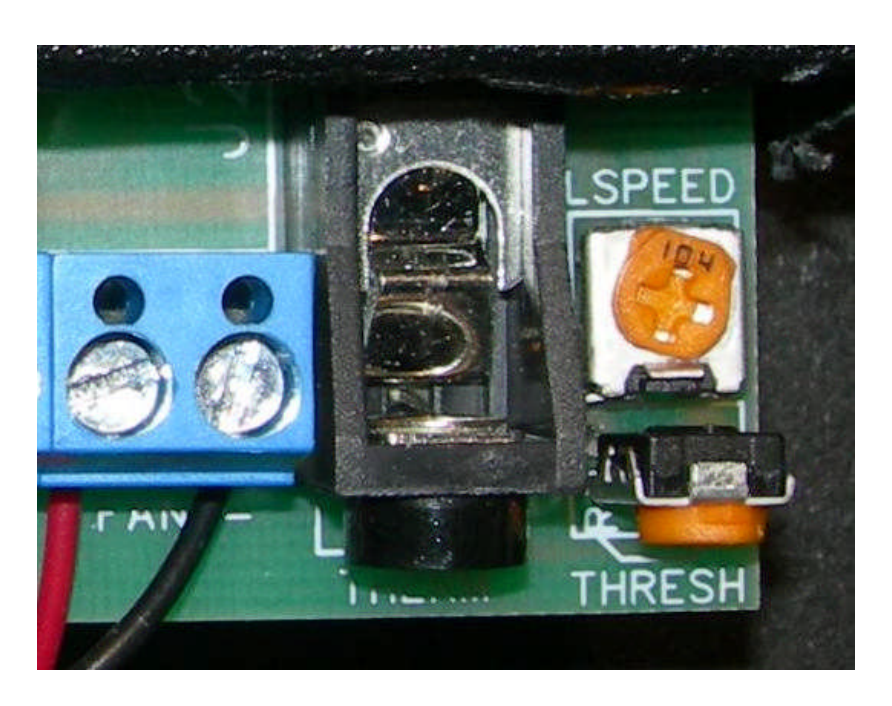
⚙️ Adjust settings using the control box:
- THRESH: Adjusts the low-speed start temperature.
- L SPEED: Adjusts fan speed during low mode.
🔹 High-speed operation always begins 10°F above low-speed threshold.
Warranty
Active Thermal Management (“ATM”) warrants the System 4 against defects in materials and workmanship for one year from date of purchase.
We will repair or replace, at our option, any System 4 with a defect. Returns must be:
- Properly packaged
- Returned prepaid with an ATM return authorization number clearly visible
- Include a copy of bill of sale or invoice
Exclusions:
Warranty does not cover:
- Shipping damage (claims must be filed with carrier).
- Improper installation or voltage damage.
- Unauthorized modifications.
- Corrosion, abrasion, immersion, or severe temperatures.
- Abuse, misuse, abnormal usage, or accident.
⚖️ These warranties give specific legal rights and may vary depending on jurisdiction.
ATM is not liable for consequential or incidental damages, property loss, profit loss, removal, installation costs, or personal damages.
For Australia and NZ Sales Only
The ATM logo is a registered trademark of Active Thermal Management.
All features and specifications subject to change without notice.
Active Thermal Management
25570 Rye Canyon Rd. Valencia, California 91355
📞 (661) 294-7999 | 📠 (661) 294-1115
📧 techinfo@activethermal.com | 🌐 www.activethermal.com